 The AI Tool Shelf
 Rachid Amesrouy
- Cardboard understood our request but would not start editing without a paid plan (from $5 for the first month).
- Opus Clip turned one song into six vertical clips with accurate captions and well-chosen moments, with a watermark; Arabic is not supported.
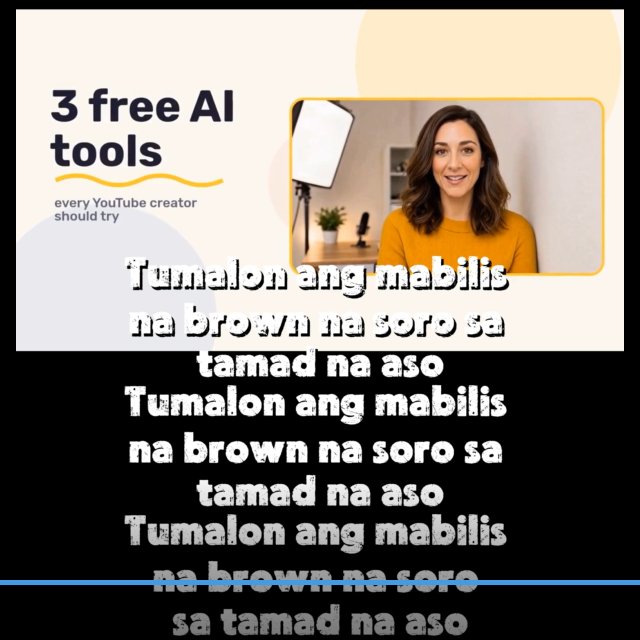
- CapCut gives 60 free minutes a month, but its export showed placeholder Filipino captions and stayed landscape.
- None of the three handled an Arabic song for free in our test.
Turning a long video into Shorts, Reels and TikToks is one of the most popular jobs for AI video tools, and almost all of them advertise a free plan. We tested three on the same evening in October 2026 with real videos from Rachid Amesrouy's YouTube music channel: Cardboard, the new "agentic" editor from Y Combinator; Opus Clip, the best-known clipping tool; and CapCut, the free editor everyone recommends. Only one of them actually delivered.
The short verdict
| Cardboard | Opus Clip | CapCut | |
|---|---|---|---|
| Works for free? | ❌ Paywall before editing | ✅ 60 credits | ✅ 60 min of video a month |
| Picked the best moments | Not tested | ✅ Yes | ⚠️ One 10-second clip |
| Captions | Not tested | ✅ Accurate (English) | ❌ Placeholder text in Filipino |
| Vertical 9:16 reframe | Not tested | ✅ Yes | ❌ Stayed landscape |
| Arabic | Not tested | ❌ Not supported | Not tested |
| Free export | — | HD with watermark | 720p-4K, no visible watermark |
Winner: Opus Clip, the only tool that turned a full song into usable vertical clips with correct captions on a free account.
Cardboard: smart, but you pay before it starts
Cardboard is a browser-based editor where you describe the edit you want in plain English. We uploaded a song and asked for a 30-second vertical short from the most emotional part, with captions. Cardboard understood the request perfectly and summarised its plan (identify the most emotional segment, reframe to 9:16, add captions synced to the lyrics), then showed a pricing page: "Your clip and your prompt are saved. Pick a plan and Cardboard starts the edit."
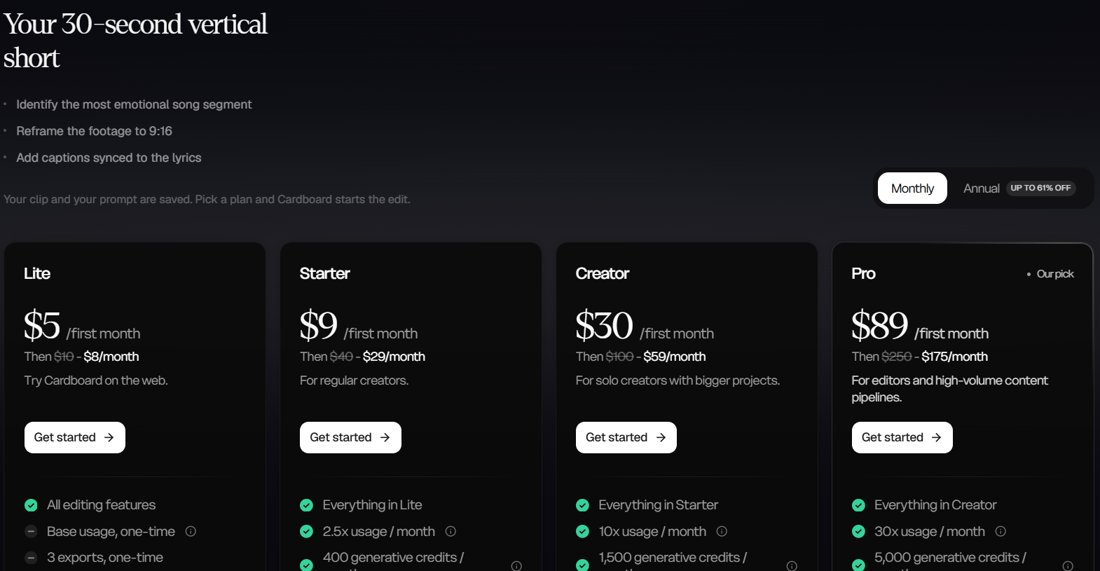
Prices in October 2026: Lite $5 for the first month, then $8/month (three exports, one-time), Starter $9 then $29, Creator $30 then $59, and Pro $89 then $175. The account settings showed a "one-time allowance" of usage credits, but in practice the edit would not start without a plan. Its AI chat also accepts instructions in English only. We did not pay, so we cannot judge its results.
Opus Clip: the one that worked
A new free account showed 0 credits at first, but after we pasted a YouTube link the balance became 60 credits, and processing one song cost just 5. The first thing we learned: Arabic is not supported. Choosing Arabic as the spoken language returned "Language [ar] is not supported", so we used one of the channel's English songs instead.

After about 25 minutes, it returned six clips, each with an AI-written title ("Good and Evil: Who Decides What's True?", "Break the Chains Tonight") and a question as a hook on screen. Our tester, who wrote the song, confirmed that it picked the strongest moments. The transcript of the lyrics was accurate.
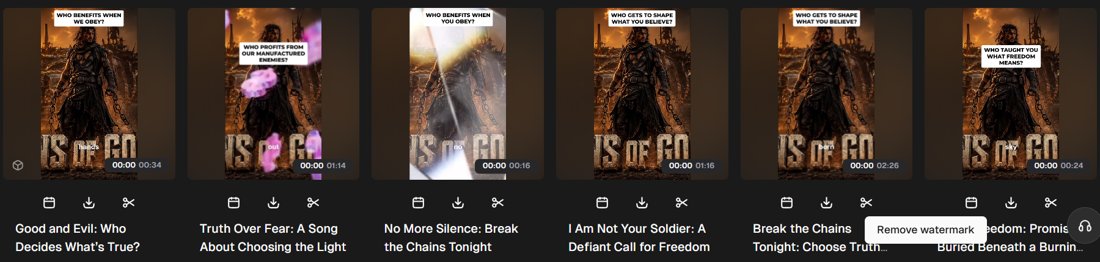
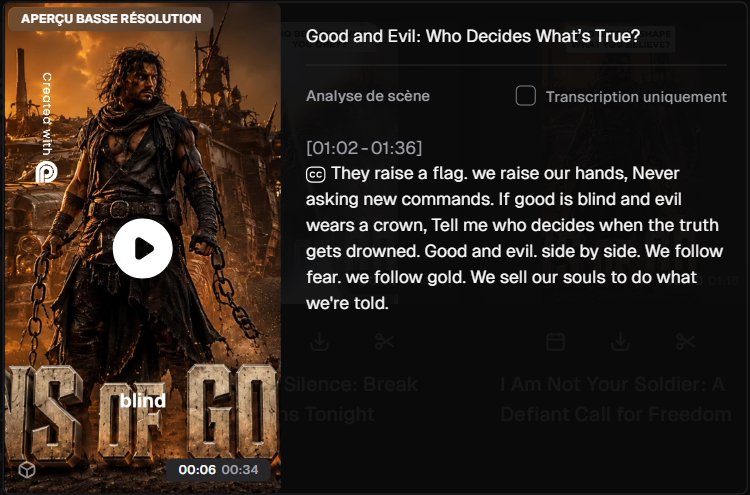
The free plan's limits: a "Created with Opus" watermark, a low-resolution preview, and editing a clip or changing its format require Pro. Downloading in HD was free; 4K needs a paid plan. Clip lengths varied from 16 seconds to 2 minutes 26, so some need trimming for Shorts. Paid plans were Starter at $12/month and Pro at $11.50/month billed yearly ($138).
CapCut: generous, but the result was wrong
CapCut's free web account had the most generous offer: 60 minutes of long-to-short conversion a month, 100 credits, and daily tasks that earn more. You choose the part of the video to convert, a caption style and a target length (under 60 seconds, 60-90 seconds and so on), and it claims support for 20+ languages.
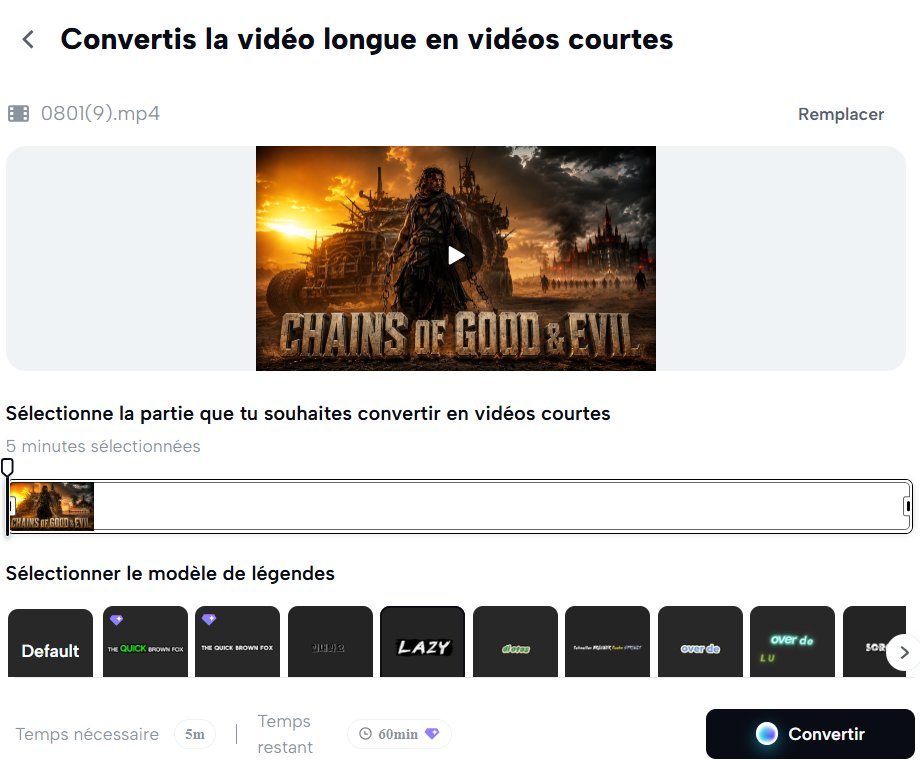
Our first try, a five-minute song in high resolution, failed with "Conversion impossible: your video was not uploaded". A one-minute presenter video worked: CapCut produced one 10-second short, and export was free at 720p, with 1080p, 2K and 4K in the menu and no visible CapCut watermark.
But when we played the export, the captions read "Tumalon ang mabilis na brown na soro sa tamad na aso", which is the Filipino version of the typing test sentence "The quick brown fox jumps over the lazy dog". It was the caption template's sample text, not a transcript of the video, repeated three times and overflowing the frame. The video also stayed landscape in the middle of the vertical frame instead of being reframed.
This may be a bug that CapCut fixes, but it is exactly why you should watch every AI clip before publishing it.
What about Arabic?
For Arabic-speaking creators, the honest answer is: none of these tools handled an Arabic song for free in our test. Opus Clip rejected Arabic, Cardboard's AI only takes English instructions, and CapCut's conversion did not produce real captions. For Arabic, the safest route remains choosing the clip yourself and adding captions with a tool you check line by line.
Which one should you use?
- Opus Clip if your videos are in English (or another supported language) and you want ready-to-post clips. The free credits are enough to judge it; pay to remove the watermark.
- CapCut for manual editing and free exports, but check every automatic caption and reframe.
- Cardboard only if you are ready to pay at least $5 for a first month; it seems built for marketing teams rather than solo creators.
Related: YouTube AI agent skills tested on the same channel and the best free AI video generators.
The verdict
"Free" means very different things for AI shorts tools. Cardboard asked for payment before doing anything, CapCut was generous with minutes but produced placeholder captions and an un-cropped video, and Opus Clip was the only one that delivered six vertical clips with accurate captions and well-chosen moments, at the cost of a watermark and no Arabic. Test with a short video first, and never post an AI clip you have not watched to the end.
Sources: Cardboard FAQ · Opus Clip · CapCut. Tested October 28, 2026.