 The AI Tool Shelf
🎬 VideoFree plan
Descript
Edit video and podcasts by editing the transcript.
Best for: podcasters and YouTubers who edit talking-head content
Agentic AI video editor that edits from plain-English instructions.
We may earn a commission if you sign up through links on this page, at no extra cost to you. Learn more.
Cardboard: Agentic AI video editor that edits from plain-English instructions. Best for marketing teams that need fast first cuts. Pricing: lite $5 first month then $8/month; Starter $29; Creator $59; Pro $175.
We tested Cardboard ourselves. Read the results: Cardboard vs Opus Clip vs CapCut: We Tested 3 'Free' AI Shorts Tools (2026)
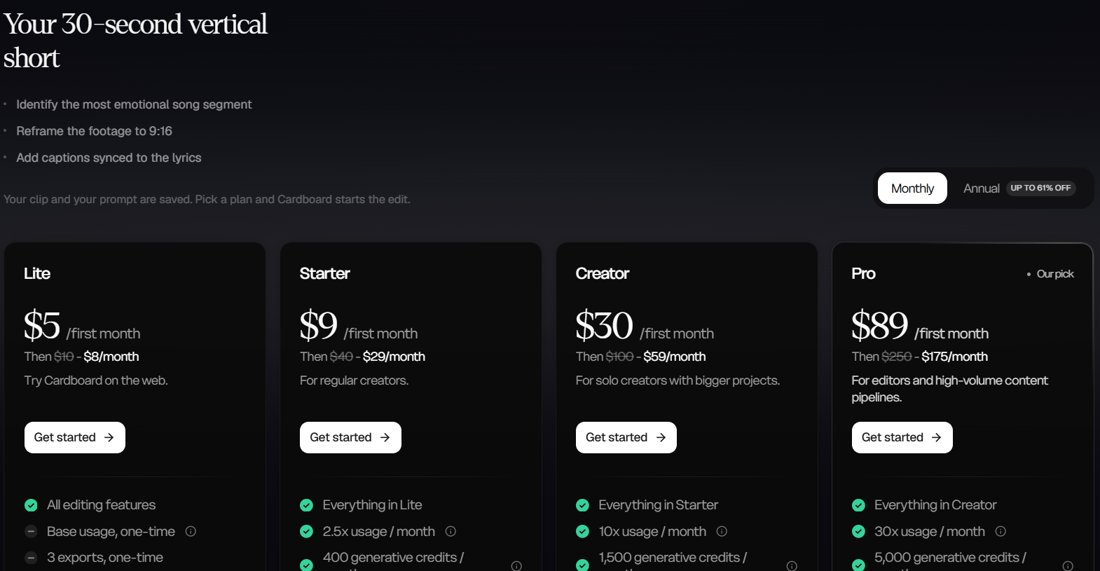
Cardboard (Y Combinator W26) is a browser-based AI video editor: upload footage, describe the edit, and it builds a first cut with captions, music and transitions, with export to Premiere Pro and DaVinci Resolve.
Lite $5 first month then $8/month; Starter $29; Creator $59; Pro $175. Prices and plan limits change often, so check the official pricing page for the latest details before you subscribe.
Start with the free option and upgrade only if it fits your work.
Cardboard (Y Combinator W26) is a browser-based AI video editor: upload footage, describe the edit, and it builds a first cut with captions, music and transitions, with export to Premiere Pro and DaVinci Resolve.
Lite $5 first month then $8/month; Starter $29; Creator $59; Pro $175. Plans and limits change often, so check the official pricing page for current details.
Cardboard is best for marketing teams that need fast first cuts.
Editing would not start without a paid plan in our test. AI chat in English only.
Popular alternatives include Descript (best for podcasters and YouTubers who edit talking-head content), Pictory (best for marketers turning articles and scripts into social videos), Synthesia (best for companies producing training and explainer videos at scale), HeyGen (best for creators who want avatar videos and short cinematic AI clips with sound), Kling AI (best for creators making AI-generated clips for social media and visuals), Runway (best for filmmakers and creators who want cinematic AI shots and effects), vidIQ (best for YouTube creators researching keywords and what works in their niche), Opus Clip (best for creators turning English videos into Shorts, Reels and TikToks), CapCut (best for free video editing and quick social clips).
Sources: Cardboard official website · Cardboard FAQ. Features and prices checked October 2026; they change often, so confirm on the official site.
Edit video and podcasts by editing the transcript.
Best for: podcasters and YouTubers who edit talking-head content
Turn scripts, blog posts and long videos into short clips.
Best for: marketers turning articles and scripts into social videos
Presenter videos with AI avatars, no camera needed.
Best for: companies producing training and explainer videos at scale
AI avatars plus HeyGen Video, a text-to-video model with sound.
Best for: creators who want avatar videos and short cinematic AI clips with sound
Generate video clips from text or a single image.
Best for: creators making AI-generated clips for social media and visuals
A creative AI video studio for filmmakers and creators.
Best for: filmmakers and creators who want cinematic AI shots and effects
YouTube keyword research, analytics and AI tools, now inside Claude and ChatGPT.
Best for: YouTube creators researching keywords and what works in their niche
Turns long videos into short vertical clips with AI.
Best for: creators turning English videos into Shorts, Reels and TikToks
Free video editor with AI captions and long-to-short conversion.
Best for: free video editing and quick social clips