 The AI Tool Shelf
 Rachid Amesrouy
- Canva AI wrote the Arabic poster text exactly as requested, unlike Ideogram in our earlier test.
- Its designs have editable text layers, so the Arabic stayed correct after we changed it.
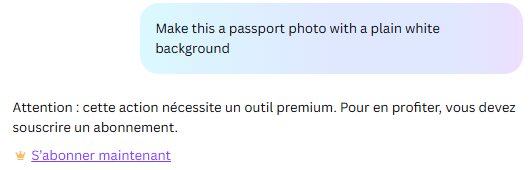
- The background remover and Magic tools are Pro only on the free plan.
- Downloads were free: a 1587 × 2245 JPG with no visible watermark.
Canva now puts an AI assistant, Canva AI, at the centre of its free plan: you describe what you want in a chat, and it generates images or complete, editable designs. Canva also recently launched its own image-generation model. We tested the free plan in October-November 2026 with a real use case close to our hearts: marketing a Moroccan photo lab, including a poster written in Arabic, the language where most AI image tools still fail.
The short verdict
| Test | Free? | Result |
|---|---|---|
| Realistic photo from a prompt | ✅ | Very realistic; Arabic sign on the shop spelled correctly |
| Poster with Arabic and French text | ✅ | 🥇 Arabic text exactly as requested, fully editable |
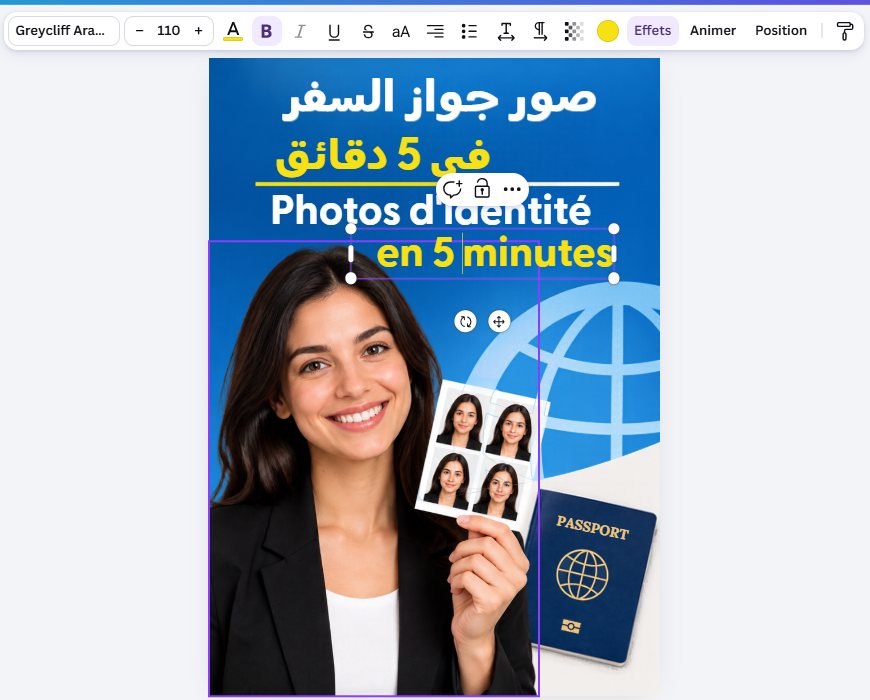
| Editing the generated design | ✅ | Arabic stayed correct after we changed the text |
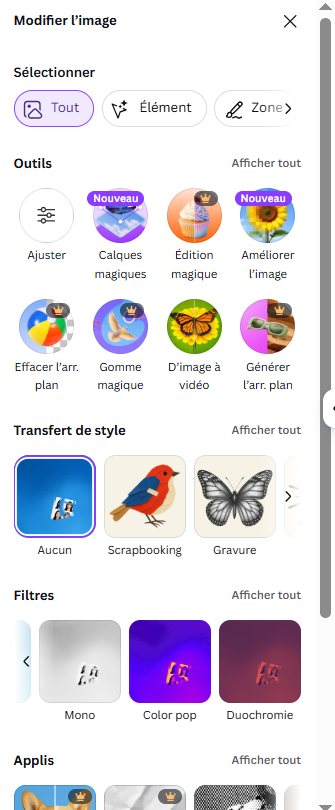
| Background remover | ❌ Pro only | Locked on the free plan |
| Facebook post in Moroccan Darija | ✅ | Usable, mostly Darija, one typo |
| Download | ✅ | JPG 1587 × 2245, no watermark |
How Canva AI works
On a free account, Canva AI appears in the left menu next to Dream Lab, Canva's image studio. It is a chat: type a request in English (or another language), and it answers with an image or a design you can open in the normal Canva editor. We did not see any credit counter on the free plan; you only find out about a limit when you reach it.
Test 1: a realistic photo
Canva AI returned one image, and it was striking: golden light on old ochre walls, a wooden door hung with black-and-white portraits, a brass lantern, cobblestones and a motorbike at the end of the alley. Without being asked, it added a shop sign reading "ستوديو الفوتوغرافيا" (photography studio), spelled correctly in Arabic, above "STUDIO PHOTO", and a French list of services (Photo, Portrait, Mariage, Événement, Argentique).
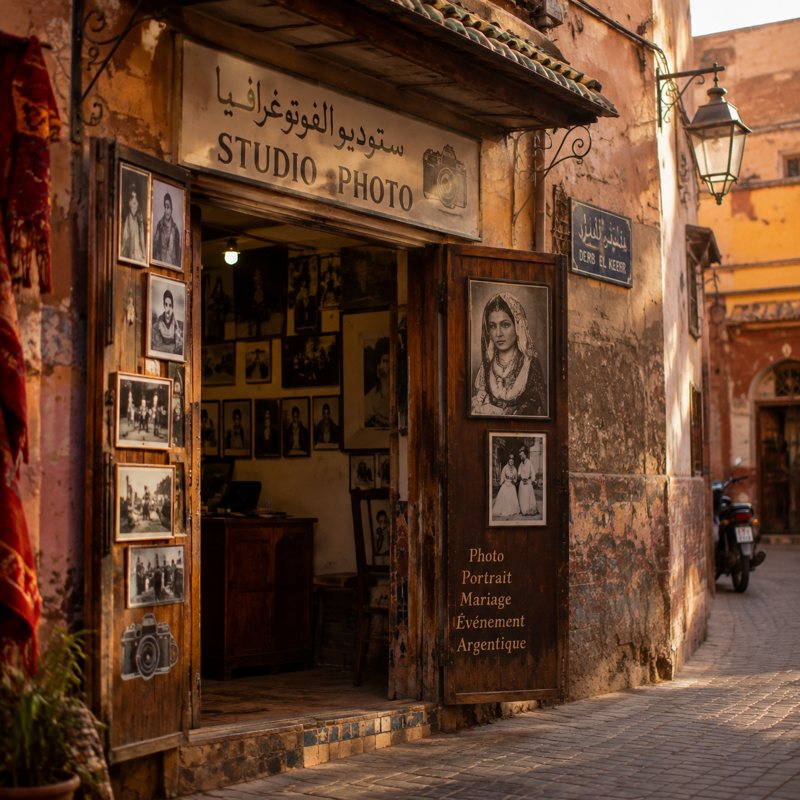
Two small flaws: the little street sign on the right has distorted Arabic letters, and the portraits on the wall look alike, a common AI tell.
Test 2: a poster in Arabic and French
This is the test Ideogram failed: its Arabic came out with errors and extra letters. Canva AI got it exactly right. The poster showed "صور جواز السفر في 10 دقائق" (passport photos in 10 minutes) in bold, correctly joined, right-to-left Arabic, the French line underneath, and a smiling woman holding a strip of four ID photos next to a passport. It is ready to print for a real photo lab window.
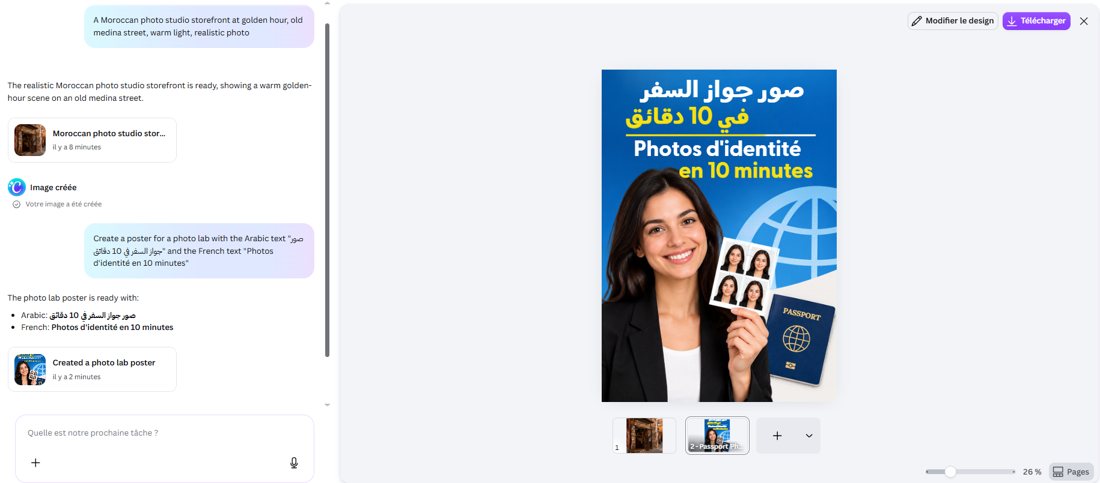
The reason is simple: Canva builds a real design with separate, editable text layers, instead of drawing letters inside a picture. That is why the Arabic is perfect, and why you can change it.
Editing the design
We clicked Edit design and changed "10" to "5" in both the Arabic and French lines. The Arabic stayed correct ("في 5 دقائق"), with the font, size and colour all adjustable in the normal Canva toolbar.
Test 3: background removal (Pro only)
For a photo lab, removing a background to make an ID photo is the most useful AI feature. On the free plan, it is locked: Background remover, Magic Eraser, Magic Edit, Image to video and Generate background all show the Pro crown. When we asked Canva AI to turn a photo into a passport photo with a white background, it replied that the action "requires a premium tool". Free image tools include Adjust, the new Magic Layers and Enhance image, filters and style transfer.
Test 4: a Facebook post in Moroccan Darija
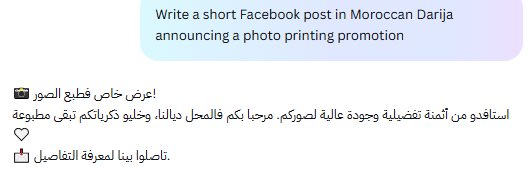
The answer was a short, usable promotion post ("عرض خاص فطبع الصور!", special offer on photo printing) with emojis and a call to visit the shop. It mixes Moroccan Darija ("فالمحل ديالنا", in our shop) with some Standard Arabic, and contains one typo ("تاصلوا" instead of "تواصلوا", contact us). Fine as a first draft, but less natural than the Darija we got from Google AI Studio.
Downloads on the free plan
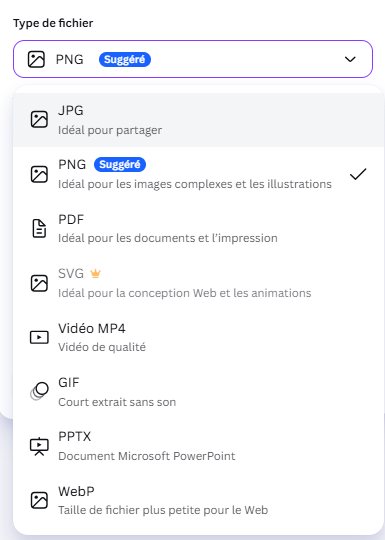
Downloading was free. Our poster came out as a JPG of 1587 × 2245 pixels (324 KB) with no visible watermark. Free formats include JPG, PNG, PDF, MP4, GIF, PowerPoint (PPTX) and WebP; SVG, custom size and quality settings need Pro.
Pros and cons
| 👍 Pros | 👎 Cons |
|---|---|
| Perfect Arabic text in designs, the best in our tests | Background remover and Magic tools are Pro only |
| Designs are fully editable, not flat images | No visible credit counter on the free plan |
| Very realistic image generation | Small Arabic text inside photos can still be distorted |
| Free downloads in many formats, no watermark | Darija writing is decent but not native-level |
Who should use it?
- Small shops and print businesses that need posters, flyers and social posts, especially in Arabic.
- Anyone who has struggled with Arabic text in AI images: Canva's editable text solves the problem.
- If you need background removal for ID photos every day, budget for Canva Pro or use a dedicated tool.
The verdict
Canva AI is the tool we would recommend first to Arabic-speaking small businesses. It turned a one-line request into a professional, print-ready poster with Arabic text exactly as written, something no image generator in our tests managed, and let us edit it freely and download it without a watermark. The free plan stops at the most useful photo tools, like background removal, but for posters, flyers and social posts it is remarkably capable for free.
Sources: Canva · Canva pricing. Tested November 3, 2026.