 The AI Tool Shelf
- Chimera is a new ElevenLabs tool that turns a character image and 4 to 30 seconds of speech into a talking video.
- It pairs the Eleven v4 voice model with the Seedance 2.5 video model, according to ElevenLabs' creative team.
- You choose 9:16, 1:1 or 16:9 and 480p, 720p or 1080p, and can add an optional prompt for gestures and mood.
- Video generation isn't on the free plan; the Starter plan ($1 the first month, then $6) covers about 3.5 minutes of video.
ElevenLabs, best known for realistic AI voices, has launched Chimera, a new tool that turns a character image and a few lines of speech into a talking video. We opened it in our own ElevenLabs account the day after launch to see where it lives, what it asks for and what you can do on the free plan. Here is our first look, with a screenshot of the real interface.
What is ElevenLabs Chimera?
Chimera describes itself in one line: "Image and voice, fused into one character." You give it a character, either an image you upload or an avatar you create, plus what the character should say, and it produces a short video of that character speaking, with matching expression and movement.
According to ElevenLabs' creative team, Chimera pairs two models: Eleven v4, the company's newest and most expressive voice model, and Seedance 2.5, a video generation model. The voice side is the part ElevenLabs is famous for; Seedance animates the image. The pitch is simple: your character can finally say its lines itself, with a voice that carries real emotion.
Where to find it
Chimera sits in ElevenLabs' creative workspace (ElevenCreative), under Templates → Chimera. The page has a settings panel on the left and an Explore gallery of examples on the right, plus a History tab for your own generations.
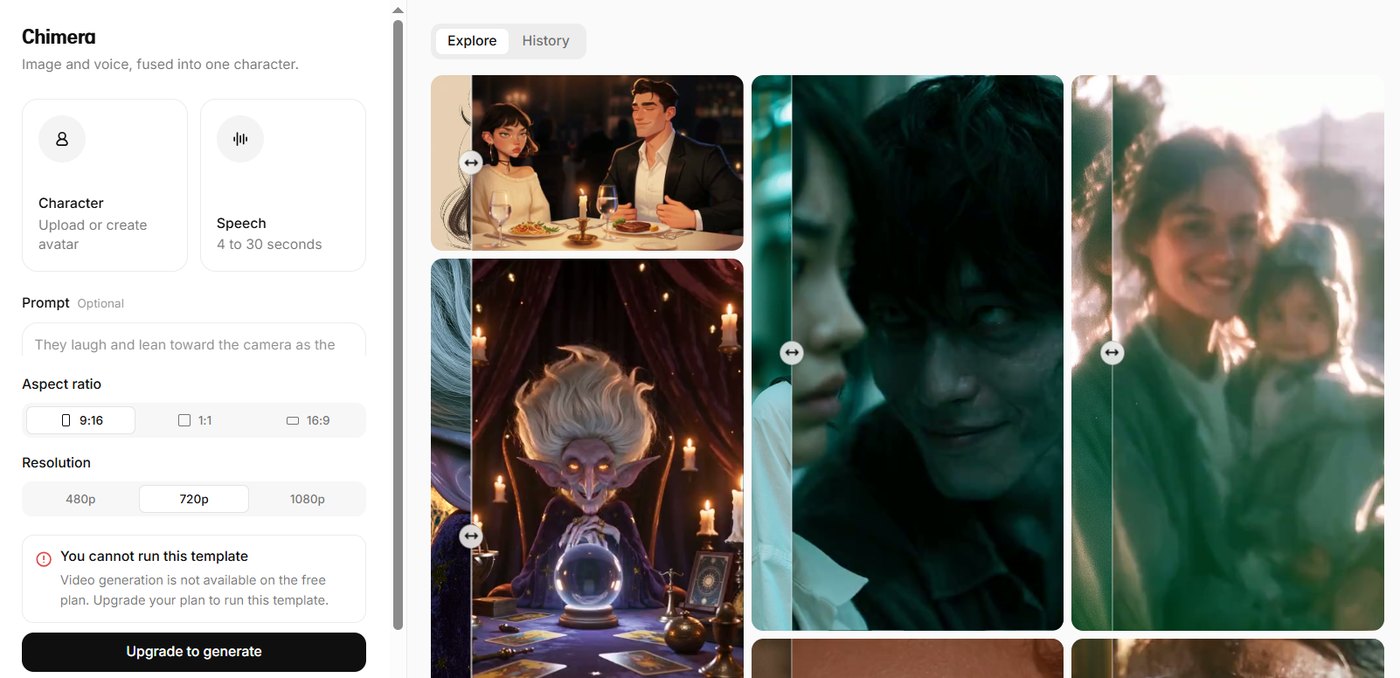
The settings, step by step
- Character: upload an image or create an avatar. This is the face that will speak.
- Speech: the line your character says, between 4 and 30 seconds long. So Chimera is built for short clips, not long videos.
- Prompt (optional): describe the action or mood. The example text reads "They laugh and lean toward the camera as the…", which shows you can direct gestures and emotion, not just lip movement.
- Aspect ratio: 9:16 for Shorts, Reels and TikTok, 1:1 for feeds, or 16:9 for YouTube.
- Resolution: 480p, 720p (the default) or 1080p.
What the examples show
The Explore gallery gives a good idea of the range ElevenLabs is aiming for. Each example has a slider so you can compare the starting image with the result. The styles go from illustrated characters (a cartoon couple at a candlelit dinner, a fantasy fortune-teller with a crystal ball) to photorealistic, film-like scenes with close-ups of real-looking faces. In other words, it is not only for realistic presenters: it works for animated and fictional characters too, which matters for storytellers and channels with a mascot.
Can you use it for free?
No. On our free ElevenLabs account, the template showed a clear message: "You cannot run this template. Video generation is not available on the free plan." The Generate button was replaced by Upgrade to generate.
That is different from ElevenLabs' voice tools: on the same free account we could generate and download speech, as in our ElevenLabs vs Murf test, and dub a video, as in our song dubbing test. Video generation is paid only.
How much does Chimera cost?
When you click Upgrade to generate, ElevenLabs shows an "Upgrade to create videos" window with every plan and how much video its credits cover. Here is what it showed us on October 22, 2026:
| Plan | Credits / month | Video included (up to) | Monthly price | Billed yearly |
|---|---|---|---|---|
| Starter | 30K | 211 seconds (or 198 images) | $6 (first month $1) | $5/mo |
| Creator | 121K | 705 seconds (or 660 images) | $22 (first month $11) | $18.33/mo |
| Pro | 600K | 59 minutes (or 3.3K images) | $99 | $82.50/mo |
| Scale | 1.8M | 3 hours (or 11K images) | $299 | $249.17/mo |
| Business | 6M | 13 hours (or 44K images) | $990 | $825/mo |
A few things stand out:
- The cheapest way to try it is the Starter plan: the first month was offered for $1, then $6 a month. Its credits cover about 3.5 minutes of video, enough for around seven 30-second Chimera clips.
- Credits are shared between images and video, and with ElevenLabs' other tools, so voice work uses the same balance.
- Pay-as-you-go top-ups are available from the Creator plan up.
- Every paid plan lists upscaling and lip sync in the same flow, plus access to other popular image and video models.
Prices and introductory offers change often, so check the current numbers in your account before you subscribe.
Who is Chimera for?
- Short-form creators who want a character or mascot that speaks in Shorts, Reels or TikTok videos
- Storytellers and animators giving voices to illustrated characters
- Marketers making quick talking-head ads or product intros without filming
- Existing ElevenLabs users who already have a favourite voice and want to put a face to it
How it compares to Synthesia
We recently tested Synthesia's free plan, which also makes videos with a speaking avatar. The two tools point in different directions:
- Synthesia builds complete explainer and training videos, with slides, scenes and an AI assistant that writes the script. Its free plan let us make and download one short video, with a watermark.
- Chimera focuses on one thing: a single character speaking a short line with emotion, from realistic to cartoon style. It looks aimed at creative and social clips rather than corporate videos, and it needs a paid plan.
Things to keep in mind
- Use images you have the rights to. Don't animate photos of real people without their permission, and check ElevenLabs' terms before using a likeness commercially.
- Disclose AI content. On YouTube, realistic AI-generated people should be labelled as altered or synthetic content.
- It is brand new. Features, pricing and limits may change quickly in the first weeks after launch.
Our first take
Chimera is a natural next step for ElevenLabs: it already had some of the most expressive AI voices, and now it can give them a face. The settings are simple, the 4 to 30 second limit and 9:16 option make it clearly built for short social videos, and the examples range from cartoons to film-like realism. The big catch is that video generation is not available on the free plan, although the Starter plan makes a first test cheap: $1 for the first month, with about 3.5 minutes of video credits. We will update this page with a full hands-on test once we generate our own clips.
Sources: our own ElevenLabs account (October 22, 2026); ElevenCreative on X; Future Tools AI News.