 The AI Tool Shelf
- Both ElevenLabs and Murf AI produced realistic voices and caught the energy of a YouTube intro.
- ElevenLabs sounded more human, with natural tone variation, and gave two takes per generation.
- Murf AI was the easiest to fine-tune, with styles, pitch, speed, pauses and emphasis in one toolbar.
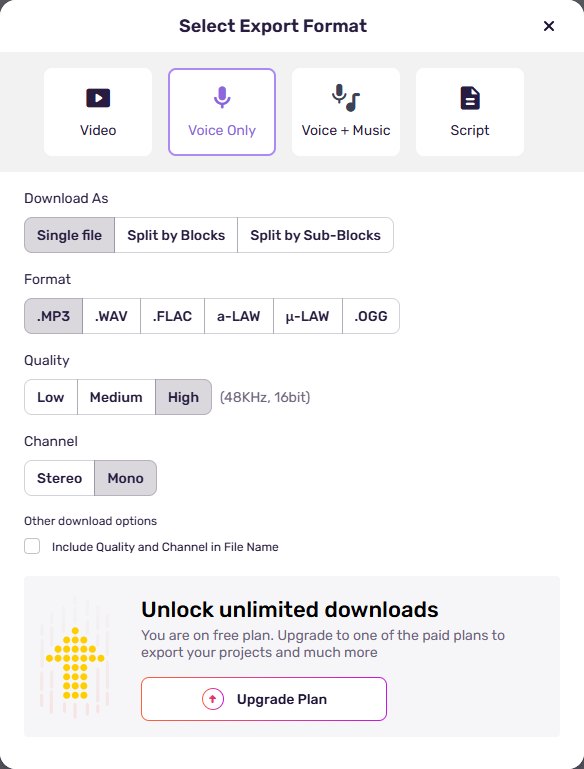
- ElevenLabs let us download an MP3 on the free plan; Murf's free plan allows previews, but downloads need a paid plan.
ElevenLabs and Murf AI are two of the most popular AI voice generators, and both promise voices that sound human. Spec sheets only tell you so much, so we ran a simple test: we gave both tools the same YouTube-style intro, picked a male American voice in each, listened carefully and tried to download the result on the free plan. Here is what we found, with screenshots from both tools.
The test
We used a short script written to sound like the opening of a YouTube video. It has an enthusiastic first line, a promise and a quick call to action, which makes it easy to hear whether a voice sounds natural or robotic:
- ElevenLabs: Text to Speech, voice "Adam – Dominant, Firm", model Eleven v4, default settings.
- Murf AI: Studio, voice "Charles (M)", English – US & Canada, Conversational style, default pitch and speed.
Both tests were done on the free plans, in October 2026.
ElevenLabs: two takes and audio tags
In ElevenLabs you paste the text, choose a voice and click Generate speech. Two things stood out:
- Two versions at once. Each generation gave us two takes (Generation 1 and Generation 2), so we could pick the better one without spending time regenerating.
- Audio tags for emotion. With the Eleven v4 model you can add tags in brackets to control delivery: emotions like [excited] or [playful], sounds like [laughing] or [sighing], and styles like [whispering] or [singing]. An Auto-tag button can add them for you.
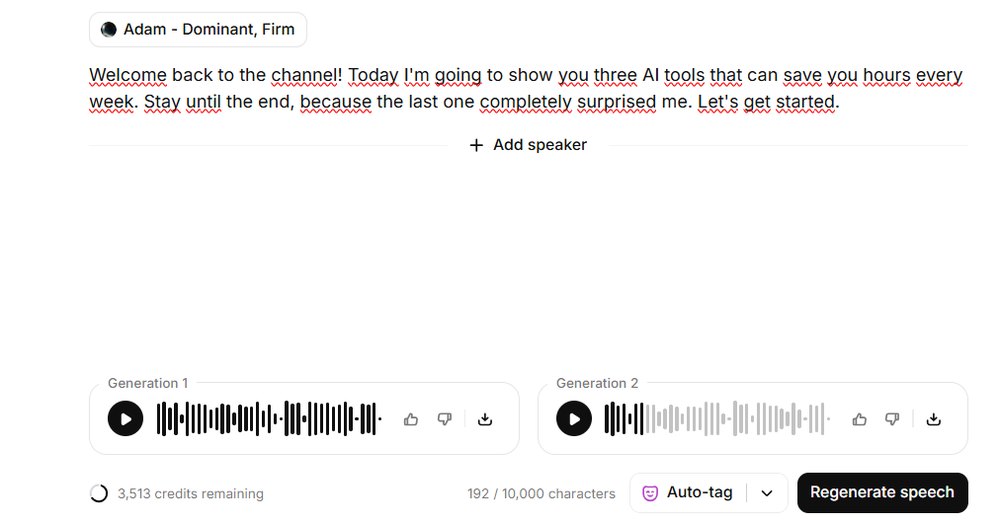
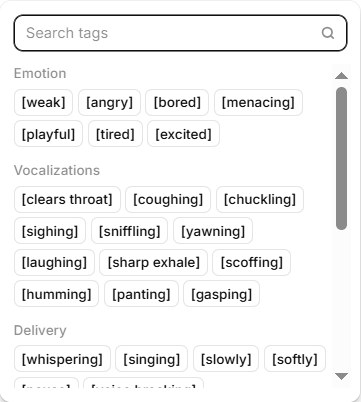
The download worked on the free plan: an MP3 file of 11.9 seconds (44.1 kHz, mono). Our 192-character script was well within the per-generation limit shown on screen (10,000 characters).
Murf AI: fine control in a studio editor
Murf works more like a production studio. Your script is split into blocks, and each block has its own voice and controls in a toolbar:
- Styles such as Conversational, Promo, Calm or Angry, depending on the voice.
- Pitch and Speed sliders, Add Pause, Variability and Emphasis on chosen words.
- A voice library you can filter by use case (YouTube, e-learning, ads, podcasts, audiobooks and more), gender, age and style. Many voices are marked MultiNative and support dozens of languages; the one we checked listed 42.

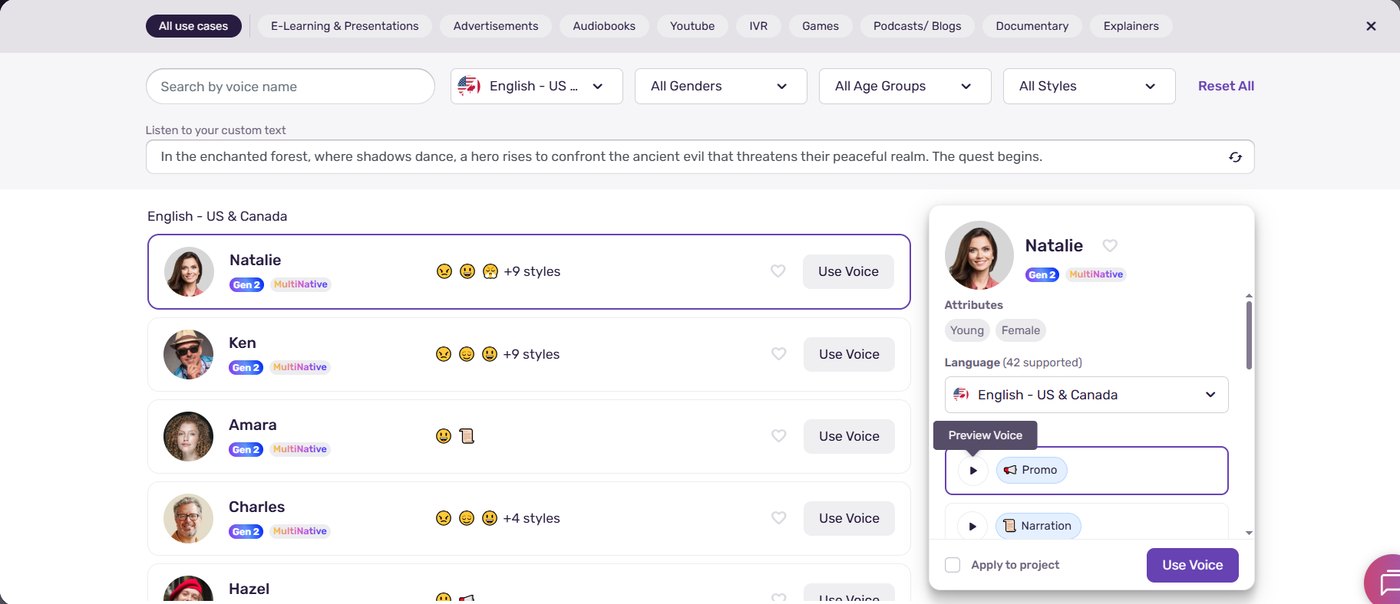
The free plan includes 10 minutes of voice generation, and you can preview everything in the editor. But when we clicked Export, the panel showed every format (MP3, WAV, FLAC and more) along with an "Unlock unlimited downloads" message: on the free plan, downloading the audio requires a paid plan.
How they sounded
This is the part that matters most, so we listened to both voices several times.
- Both were realistic. Neither sounded robotic, and both handled the enthusiastic "Welcome back to the channel!" with clear energy.
- ElevenLabs felt more human. Adam had more natural variation in tone, the small rises and falls in pitch you hear when a real person talks. It sounded less like reading and more like speaking.
- Murf was clean and steady. Charles in Conversational style was clear and pleasant, with a more even, polished delivery that suits presentations and explainers.
Side by side
| ElevenLabs | Murf AI | |
|---|---|---|
| Voice realism | Excellent, most human-sounding in our test | Very good, clean and steady |
| Ease of use | Simple: paste, pick a voice, generate | Easiest to fine-tune, everything in one toolbar |
| Takes per generation | Two versions at once | One |
| Emotion control | Audio tags and Auto-tag | Styles, pitch, speed, pauses, emphasis |
| Free download | Yes, MP3 | No, export needs a paid plan |
| Best for | YouTube, storytelling, character voices | E-learning, presentations, corporate videos |
Which one should you choose?
- Pick ElevenLabs if realism matters most, for YouTube narration, stories or ads, and if you want to try it for free and actually download your audio.
- Pick Murf AI if you produce lots of structured voiceovers, such as training videos or slide presentations, and like a studio editor where you can adjust pitch, pauses and emphasis line by line.
Whichever you choose, check the licence before publishing: commercial use and attribution rules depend on your plan, and they change over time.
The verdict
Both tools produced realistic voices from the same script, and both caught the energy of a YouTube intro. ElevenLabs won on realism, with more natural tone variation, plus two takes per generation and free downloads. Murf won on ease of use, with a clean editor that puts every control at your fingertips, but its free plan is only for previewing. If you are starting out, try ElevenLabs first; if you need precise, repeatable voiceovers for work, Murf is worth testing too. For the full feature lists, see our ElevenLabs vs Murf AI comparison and the guide to making an AI voiceover for YouTube.