 The AI Tool Shelf
Most of the world doesn't speak your language. Dubbing a video used to mean hiring translators and voice actors for every language, which put it out of reach for most creators. AI dubbing tools now promise to translate a video and re-voice it in minutes, even keeping the speaker's own voice. We wanted to see how far that goes, so we gave ElevenLabs' dubbing tool one of the hardest tests possible: an emotional English song from our own YouTube channel, dubbed into Japanese. Here is how to do it, what happened and what to watch out for.
What AI dubbing actually does
An AI dubbing tool takes care of the whole chain that used to need a team:
- Transcribes what is said (or sung) in the original video
- Translates it into the target language
- Re-voices it with a synthetic voice, often modelled on the original speaker
- Mixes the new voice back with the original music and background sound
For creators, that means one video can reach viewers in Spanish, Hindi, Japanese or Arabic without re-recording anything.
Step 1: Choose a short video to start
Dubbing uses credits based on the length of the video, and free plans include only a small amount. Start with a clip under one minute. We used a 26-second excerpt of our song "Don't Call Me Tonight" to keep the test cheap.
Only dub videos you own or have the rights to. Dubbing someone else's content and re-uploading it is a copyright problem, whatever tool you use.
Step 2: Add your video
In ElevenLabs, open the creative workspace (ElevenCreative) and choose Dubbing in the left menu. You can either upload a video file from your computer or paste a link. We simply pasted the YouTube link of our video.
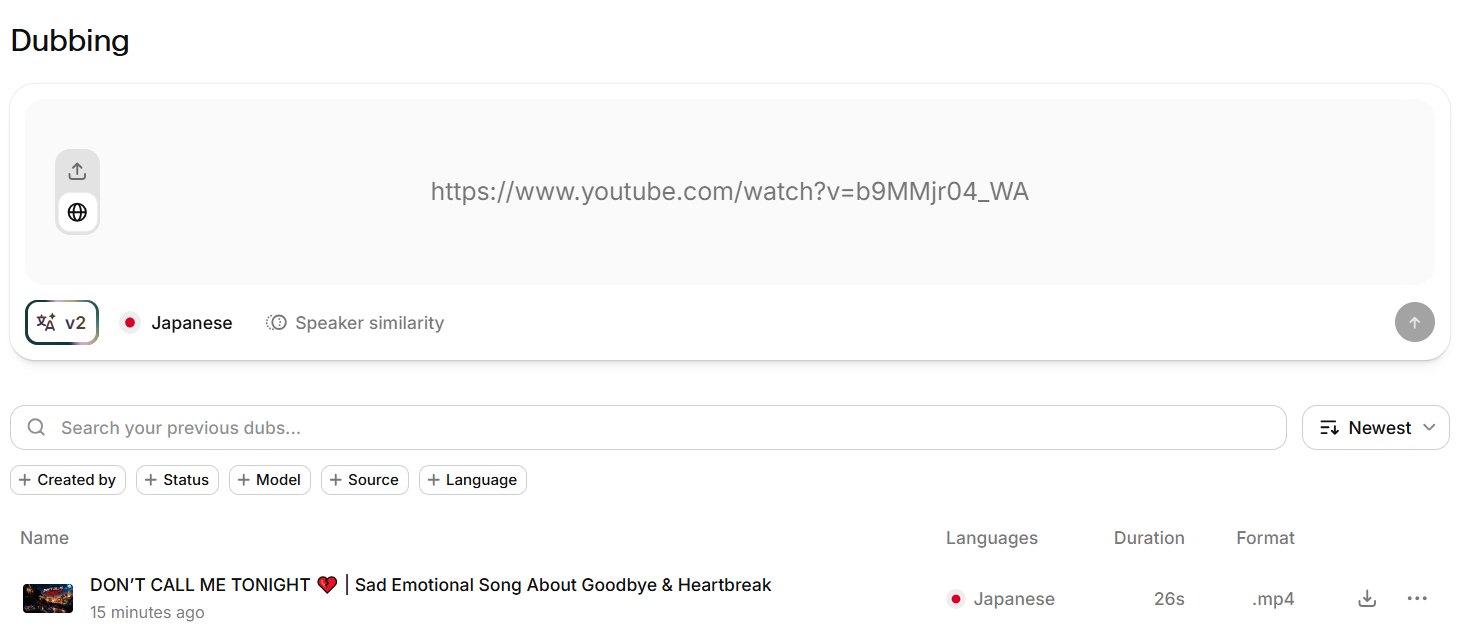
Step 3: Pick the language and options
Select the target language (we chose Japanese). The screen also shows the dubbing model and a Speaker similarity option, which controls how closely the new voice should match the original speaker. Then start the dub and wait for it to process. When it is done, the dub appears in your list with its language, duration and format, ready to preview or download.
Step 4: Check the result
This is where we expected problems. Speech is one thing; a song with melody, rhythm and emotion is much harder. Here is what we found when we listened to the Japanese version:
- It sang, not just spoke. The Japanese lyrics followed the melody instead of being read flatly over the music.
- The voice sounded like the original singer. The character and tone of the voice carried over to Japanese.
- The music stayed clean. The instrumental track was kept in the background without obvious artefacts or leftover English vocals.
- Length and structure were preserved. The dub kept the original 26 seconds, with continuous audio from start to finish.
Our overall verdict for this clip: excellent, and far better than we expected for a song.
The limits of the free plan
Two things in our free-plan result are worth knowing before you publish anything:
- Watermark: the exported video carried a "Dubbed with ElevenLabs" watermark in the bottom-right corner for the whole clip.
- Resolution: our exported file was 854×480 (480p), lower than a typical HD upload.

That is fine for testing, but for a real upload you will want a paid plan. Check the current plan details on the official site, since limits change.
Step 5: Review and fix the translation
Even when the result sounds great, do not publish blindly, especially in a language you don't speak:
- Ask a native speaker to listen once if you can. A word that sounds fine to you may be wrong or awkward.
- Pay attention to names, slang and wordplay, which translate poorly.
- ElevenLabs now lets you edit dubs directly in its editor, so you can correct a line instead of redoing the whole video.
Step 6: Publish for international viewers
There are two common ways to publish a dubbed version on YouTube:
- A separate video or channel for each language, with a translated title and description.
- Multi-language audio tracks on the same video, if the feature is available for your channel. Viewers can then pick their language from the player settings.
Either way, translate the title, description and tags too. A Japanese viewer will rarely find a video whose title is only in English.
Speech vs songs: what to expect
Spoken content (tutorials, vlogs, explainers) is the main use case for AI dubbing and generally the easiest to get right. Songs are much harder because the translated lyrics have to fit the rhythm and melody. Our song test went surprisingly well, but results will vary from track to track, so always listen to the full dub before publishing.
The verdict
AI dubbing has become genuinely usable for creators. In our test, ElevenLabs turned an English song into a Japanese version that kept the melody, the singer's voice and a clean instrumental, in a few clicks. The free plan is enough to judge the quality, but its watermark and 480p export mean you will need a paid plan for real uploads. If you want to reach viewers beyond your own language, it is one of the most impressive AI tools you can try today.