 The AI Tool Shelf
- From one prompt, Synthesia's Syren assistant wrote the script, created an avatar and designed the scenes in 4 minutes 22 seconds.
- It noticed its first voice didn't match the avatar and switched to a better one by itself.
- The 39-second video had accurate lip sync and a natural voice, almost exactly the 40 seconds we asked for.
- The free plan let us download the video with a visible watermark, but this one video, with a custom avatar, used up the plan's credits.
Synthesia is best known for AI avatars: realistic presenters that speak your script on camera, without a camera, a studio or an actor. We wanted to see what you can actually do on the free plan, so we asked it to make a short explainer for YouTube creators from a single prompt. The result surprised us, mostly because of how much Synthesia did on its own. Here is the full test, with screenshots.
The free plan at a glance
Synthesia's pricing page (checked in October 2026) lists four plans. The free plan, called Basic, needs no credit card and includes 500 credits a month, which the page says is enough for up to 10 minutes of video or 10 minutes of AI dubbing.
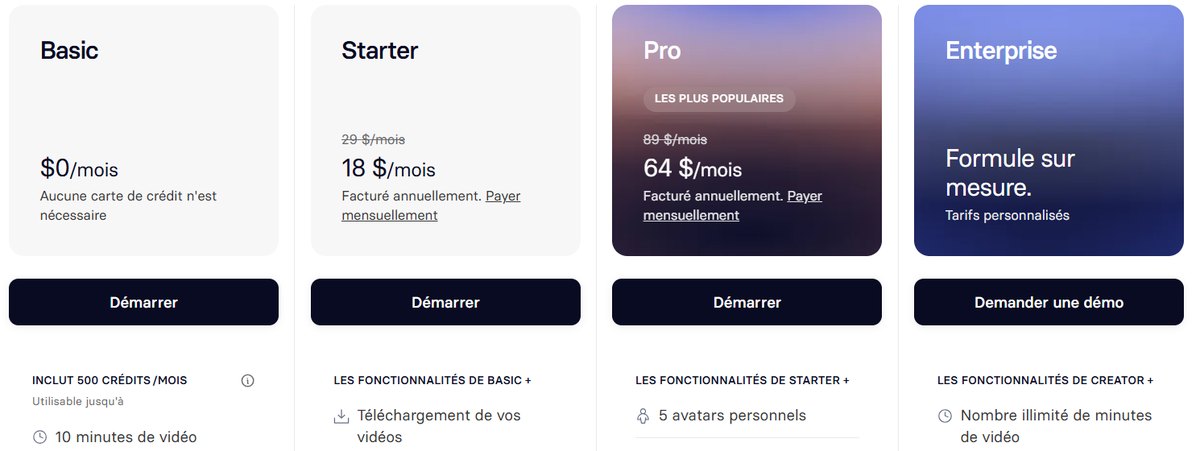
- Starter: $18/month billed yearly ($29 monthly). The page lists video downloads, removal of the Synthesia logo, AI dubbing and 125+ stock avatars.
- Pro: $64/month billed yearly ($89 monthly), with personal avatars, more minutes and more features.
- Enterprise: custom pricing for companies.
Sign-up was quick: after confirming our email with a code, Synthesia asked about our role to set up the workspace, then opened its home screen.
Step 1: Describe the video to Syren
The home screen is built around Syren, Synthesia's AI assistant, with a simple question: "what are we making?". You type what you want, choose the format (we kept Landscape for YouTube) and send. There are also quick-start templates for training, how-to, explainer and marketing videos.
We kept the request short to save free minutes:
Step 2: Watch Syren build the video
This is where Synthesia stood out. Syren didn't just fill a template: it worked through the job step by step, and its chat panel showed what it was doing.
- It wrote the script, and added delivery cues such as [excited], [short pause] and [warmly] so the presenter sounded natural.
- It handled pronunciation, writing "A I" and "the A I tool shelf dot com" so the avatar would say them correctly.
- It created a new avatar for the video, a presenter named Maya.
- It fixed its own mistake. The first voice came back male, which didn't match Maya. Syren noticed, said so in the chat and switched to a female voice by itself.
- It designed the scenes: a slide per tool with on-screen titles, "Free plan" and "Free trial" badges, and a closing scene with our website in a bright banner.
The whole video was built in 4 minutes 22 seconds, and it came out at 39 seconds, almost exactly the 40 we asked for.
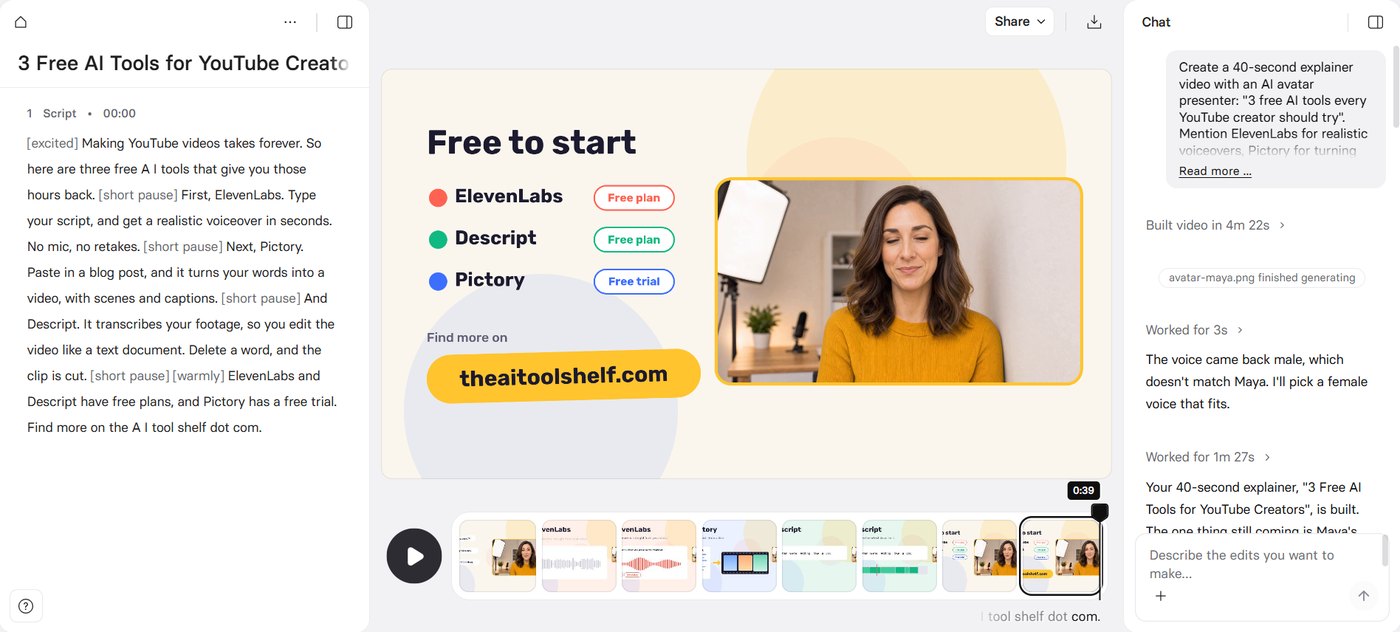
You can then edit the script directly, or ask Syren for changes in plain language in the chat box, such as a different tone or a slower ending.
Step 3: Check the result
We watched the full video before downloading it. Our verdict:
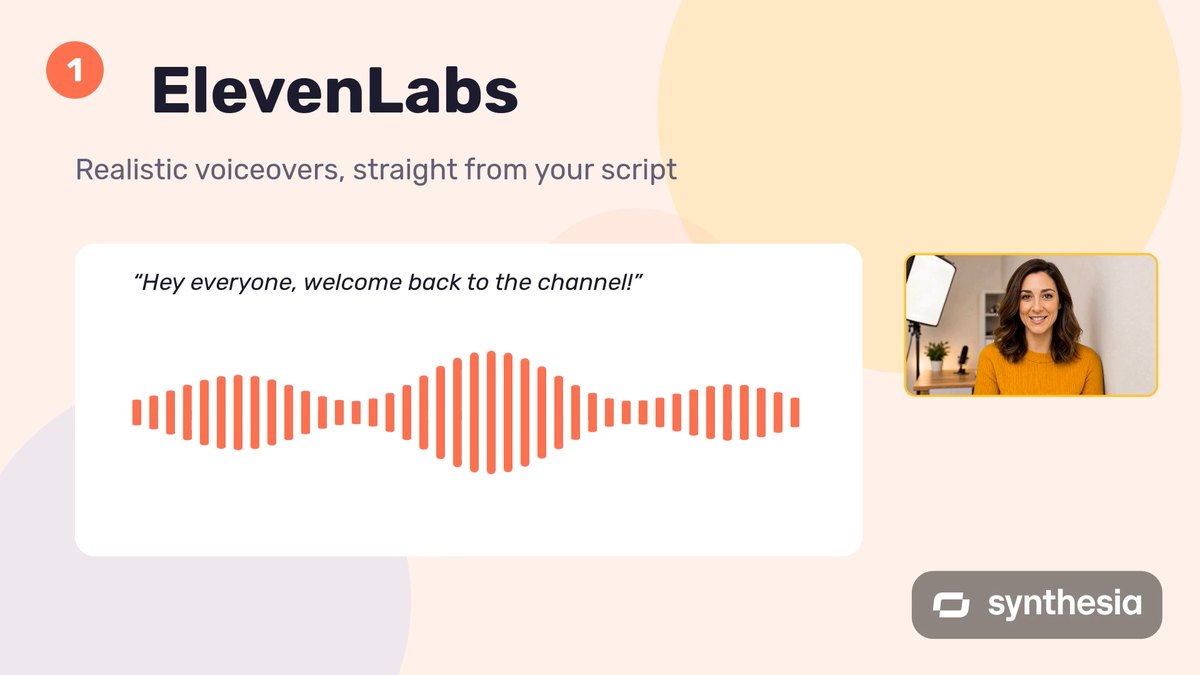
- Lip sync was accurate: the avatar's mouth matched the words.
- The voice sounded natural, with the energy we asked for.
- The design was clean and on-brand for creators, with clear titles for each tool.
Step 4: Download
The pricing page lists video downloads under the paid Starter plan, so we expected the download to be locked. In our test, though, the free account let us download the video, and the quality was good. The catch is the Synthesia watermark in the bottom-right corner, which is fairly visible. Removing it requires a paid plan. Plan details change, so check what your account allows before you start a big project.
What could be better
- The watermark on the free plan is larger than the small badge we saw in Pictory, and hard to ignore.
- Free credits ran out fast. The plan promises up to 10 minutes of video a month, but shortly after making our single 39-second video, we got a notice that our workspace had "reached the credit limit on its plan". Synthesia didn't show a breakdown, but generating a brand-new custom avatar and letting Syren build everything likely used more credits than a simple stock-avatar video. If you want to stretch the free plan, pick an existing avatar and keep the video short.
- Check the facts in the script. Syren writes fast and well, but it is still AI. Read the script before you publish, especially names, prices and claims.
- It is built for business video first: training, onboarding and explainers. For YouTube, the presenter-plus-slides style works best for tutorials and tool roundups, less for vlogs or entertainment.
Synthesia or Pictory?
We also tested Pictory on a similar task. In short: Pictory turns an existing article into a video with stock footage and a voiceover, which is ideal for repurposing blog posts. Synthesia creates a presenter-led video with an AI avatar, from a prompt or a script, and its Syren assistant does more of the work for you. Synthesia also stuck to our requested length, while Pictory's video ran longer. See the full Pictory vs Synthesia comparison.
The verdict
From one short prompt, Synthesia's Syren assistant wrote the script, created an avatar, fixed its own voice mismatch, designed the scenes and delivered a 39-second video with accurate lip sync and a natural voice, in under five minutes. On the free plan we could download it in good quality, with a visible watermark. If you want a presenter on screen without filming yourself, for tutorials, explainers or training videos, it is one of the most impressive AI video tools we have tested.